

Managing group accommodation in hotels or event venues,
without a hotel PMS
Châteaux, estates, MICE hotels, and convention centers host group bookings every day without having — or wanting to use — a traditional hotel PMS. In this context, how can rooming, room allocation, and participant collection be managed effectively? Here is an overview of current practices, and the approach we propose with Lab Event.
Hotels, estates, and event venues: a group market still poorly equipped
In France, a significant share of MICE activity (meetings, incentives, conferences, events) takes place in seminar hotels, châteaux, and estates that host entire groups on-site.
However, most accommodation software solutions were designed for individual bookings. As soon as an organizer reserves a block of rooms for a seminar or wedding, the logic changes: it becomes event-based, participant names are often provided late, invoicing is consolidated, and the stay follows a structured programme. As a result, many venues still manage all of this using Excel and email, due to a lack of suitable tools.
First, let’s break down the concrete challenges, then look at what a hotel PMS actually is—and why it is not designed for group management.
Event venues are not hotels.
A château hosting 30 seminars per year, a wine estate with 20 rooms, or a resort do not have the same needs as a 200-room hotel. Yet, most market solutions treat them as if they did.
Too complex and too expensive PMS systems
Hotel PMS platforms (Opera, Mews, Protel, etc.) are designed for hotels with 24/7 front desk operations, revenue management, and OTA connectivity. For an event estate, they are oversized — and cost-prohibitive.
Time-consuming Excel spreadsheets
Many venues still manage group rooming in Excel files: high risk of errors, no synchronization with quotations, no real-time tracking, and no easy sharing with the organizer.
No smooth communication with the organizer
Without a dedicated tool, guest name collection, individual room requests, and last-minute changes are handled via email — with no traceability or centralization.
Fragmented event management
Quotes, schedules, meals, activities, and accommodation are managed in separate tools. The result: wasted time, inconsistencies, and errors during the event.
Understanding the market
What is a hotel PMS—and why isn’t it designed for your needs?
A Property Management System (PMS) is the central software used by a hotel. It manages individual bookings, real-time room status, room-by-room invoicing, connectivity with OTAs (such as Booking.com and Expedia), and often includes food and beverage management.
These systems are powerful—and essential for a traditional hotel. However, they are built on a specific model: each guest books individually, arrives and departs at different times, and pays for their own room.
For an event venue managing groups—seminars, weddings, incentives, or conventions—this model is not suitable:
- The group is managed as a single block, not as individual guests.
- The organizer centralizes the booking, not each individual participant.
- Participant names are often provided late.
- Invoicing is global (based on a quotation), not individual.
- The event programme drives the stay, not individual arrival times.
This is precisely the reality that Lab Event addresses.
What a hotel PMS does
- ✓Online individual bookings
- ✓Automated check-in / check-out
- ✓OTA connectivity (Booking, Expedia…)
- ✓Room-by-room billing
- ✓Yield management (dynamic pricing)
- ✗Event group management
- ✗Rooming linked to a quote/program
- ✗Organizer-based manual allocation
- ✗External guest name collection
- ✗Consolidated view of quote + accommodation
How to manage group accommodation in practice
What does accommodation management look like without a hotel PMS? Here are four key views—calendar, allocation, and guest list—that show how group rooming is organized on a day-to-day basis.
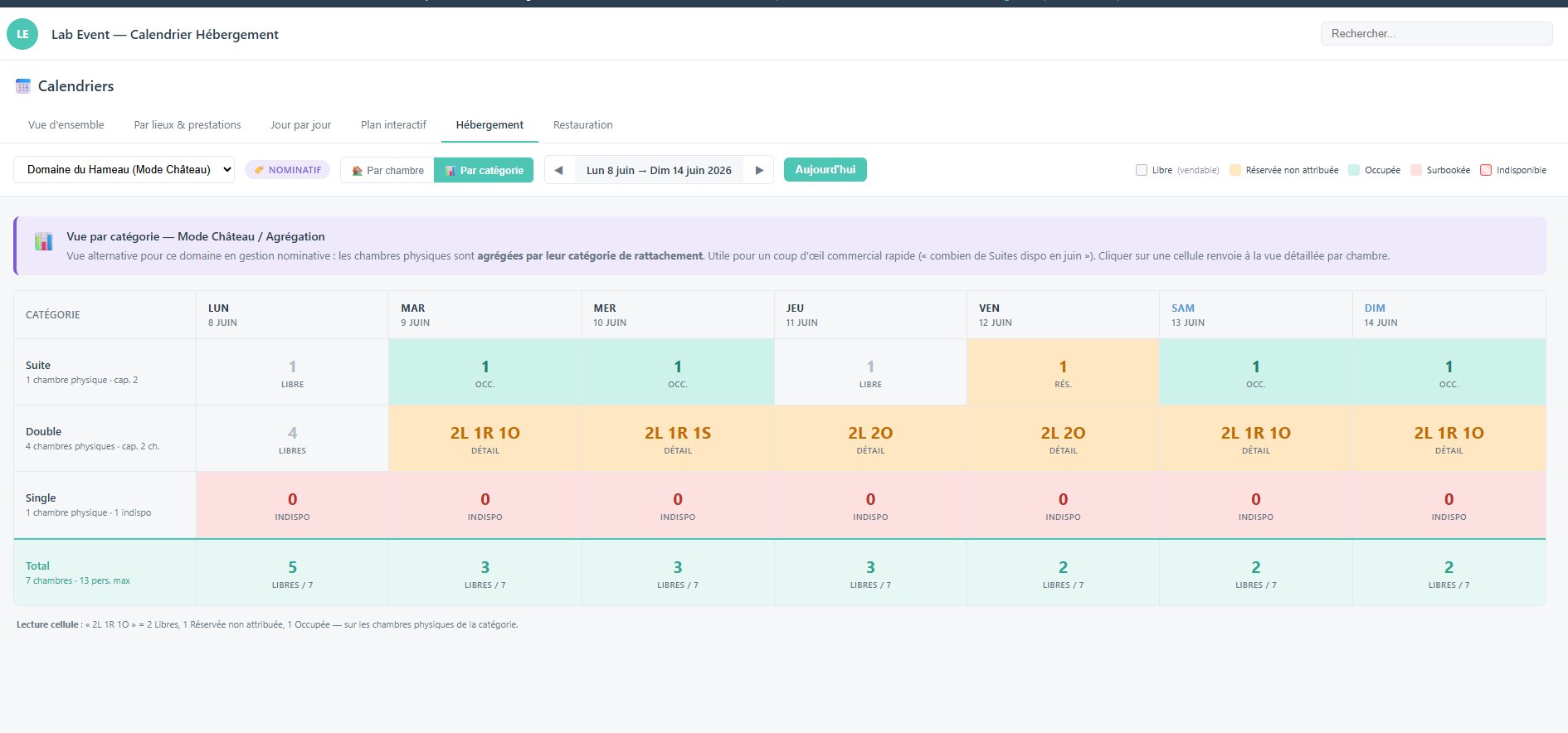
Calendar by category: an instant business overview
How many suites are available in June? How many double rooms are available this weekend? This view aggregates your physical rooms by category over a rolling week.
- Colour-coded statuses: Free, Reserved but not allocated, Occupied, Overbooked, Unavailable
- Immediate cell status: ‘2L 1R 1O’ = 2 Free, 1 Reserved, 1 Occupied
- Click on a cell → detailed view by physical room
- Perfect for replying within 10 seconds to an organiser asking for arrangements
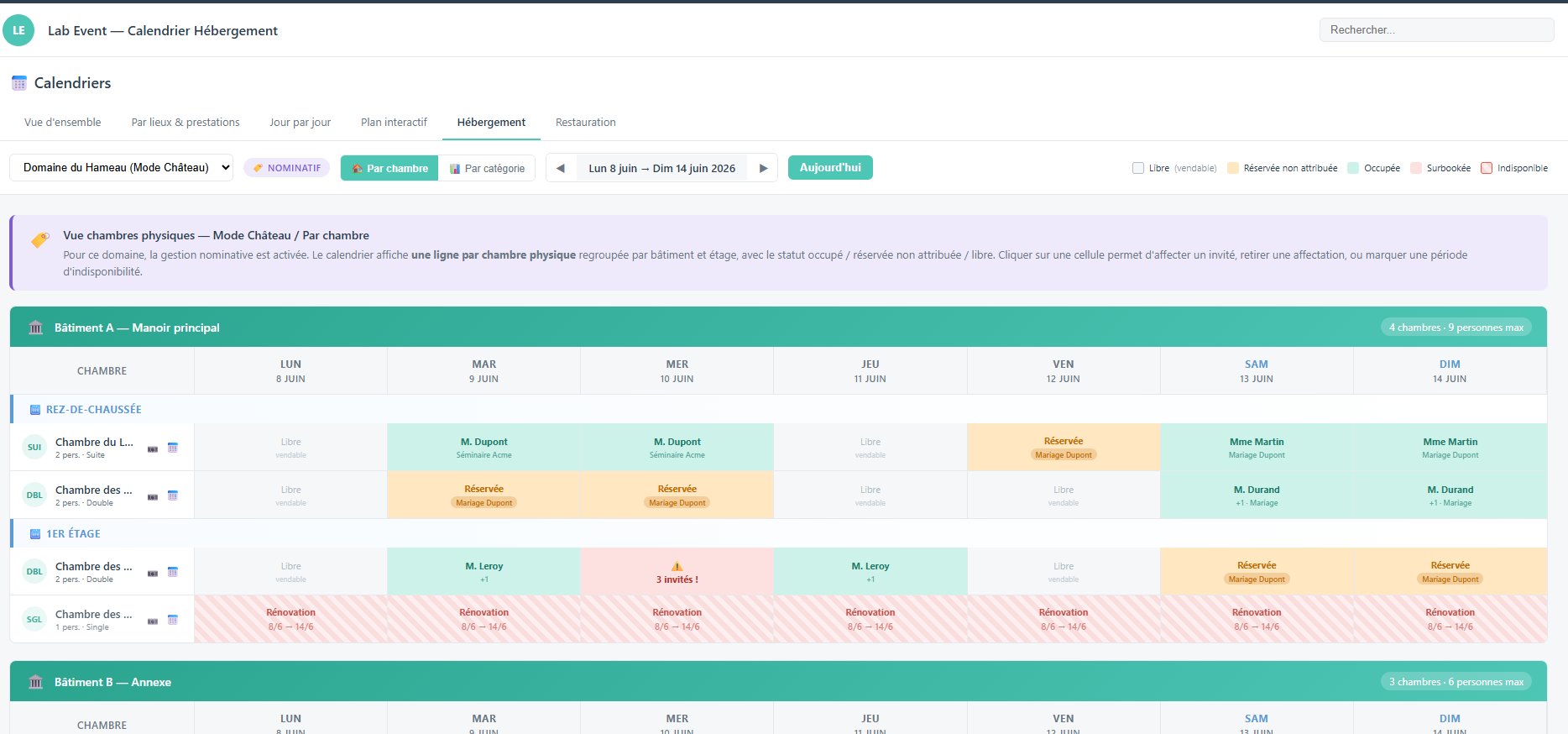
One line per room, organised by building and floor
The site view: each physical room in your estate appears on a separate line, grouped by building (Main Manor House, Annex, etc.) and by floor. You can see at a glance who is where, and for how long.
- Participants’ names are directly visible in the cells
- Event details displayed under each booking (Acme Seminar, Dupont Wedding, etc.)
- Visual alerts for overbookings (⚠️ 3 guests!)
- Periods of unavailability (works, refurbishment) shown in red hatching
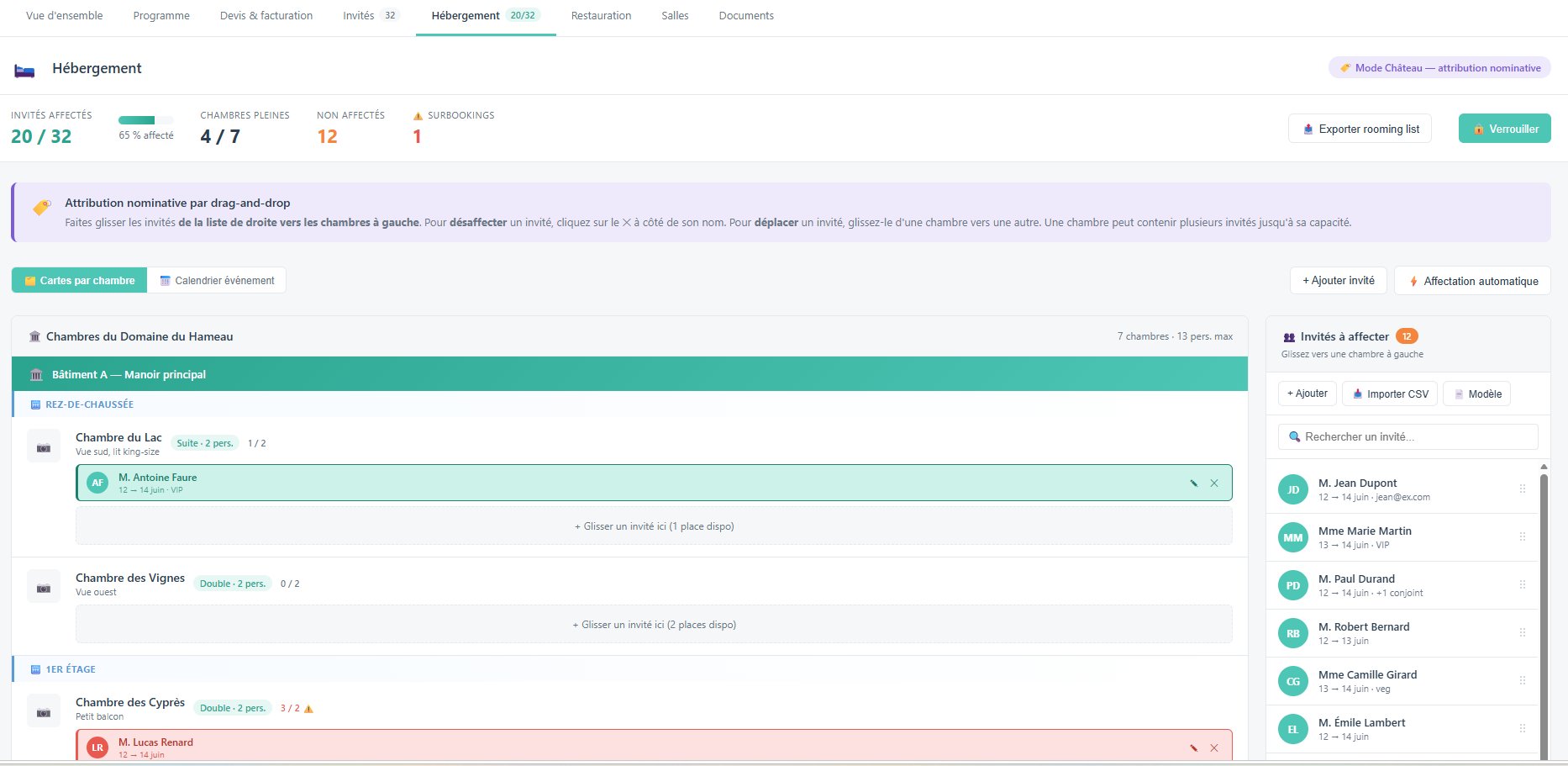
Drag-and-drop assignment by name
In each event folder, the Accommodation tab allows you to assign each guest to a specific room. The list of unassigned guests is on the right, and the rooms are on the left.
- Drag a guest from the list to the desired room
- Real-time status: 20 out of 32 guests allocated, 4 out of 7 rooms occupied, 12 unallocated
- Automatic allocation available for large groups
- Export the rooming list with a single click for your reception team
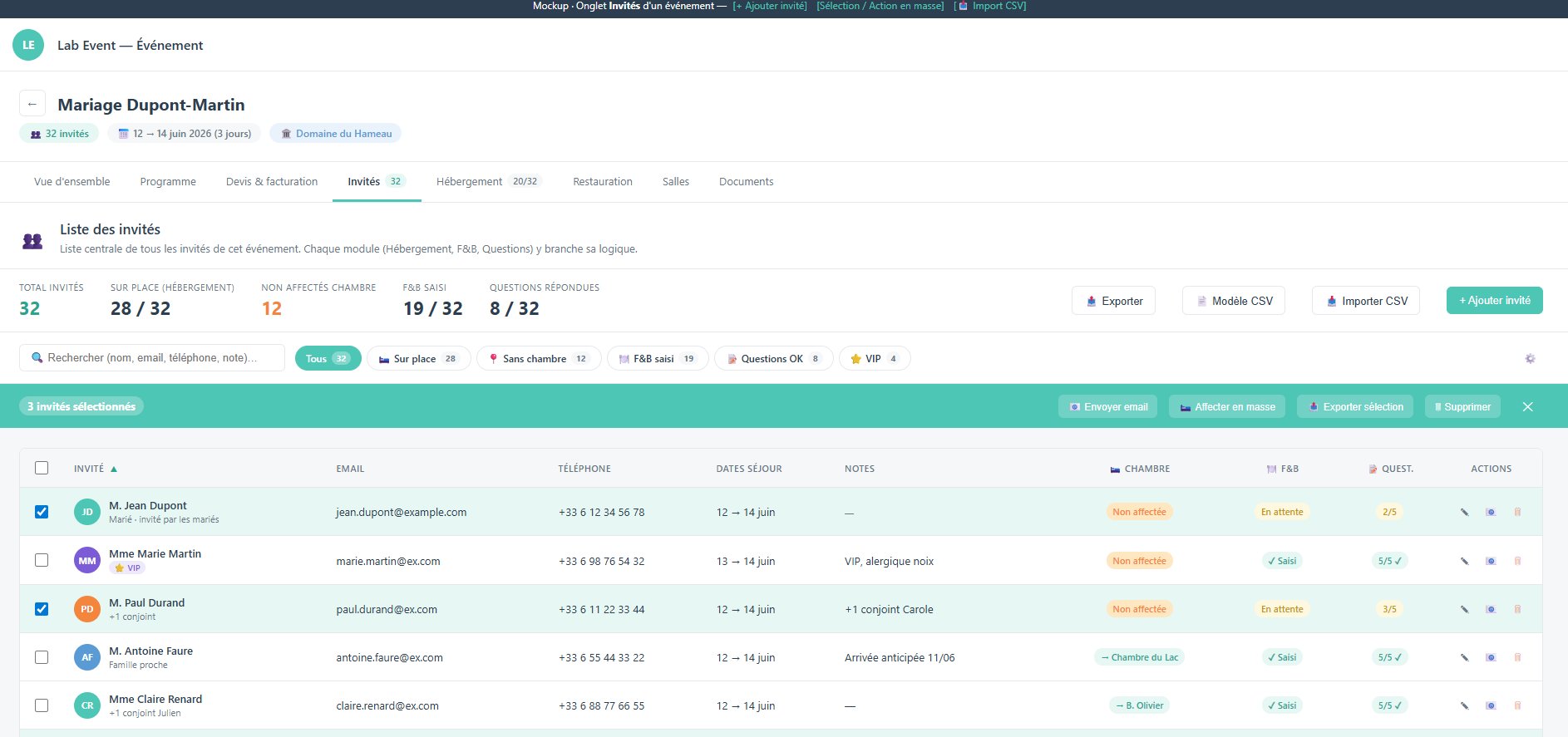
All your participants and all their details, in one place
The central guest list for an event brings together all the relevant information: contact details, dates of stay, allocated room, F&B status, and answered questions. No more switching back and forth between Excel and email.
- Quick filters: On-site, No bedroom, Food & drink included, VIP
- Multiple selection and bulk actions (bulk email, assignment, export)
- CSV import/export for integration with your organiser’s lists
- Room status visible directly in the list (Unassigned / Lake Room…)
Hotel PMS vs. Lab Event:
what really changes
A direct comparison of the two approaches to group accommodation management in an event venue.
| Criterion | Classic hotel PMS | Lab Event |
|---|---|---|
| Primary target | Hotels with individual booking flows | Event venues, châteaux, estates, convention centers |
| Booking model | Individual, night-by-night | Group-based, linked to an event file |
| Rooming management | Not native — requires third-party modules | Native — allocation, distribution, visualization |
| Guest name collection | Not included (individual flow) | Dedicated module, shareable link for the organizer |
| Link with event quotation | Not available | Integrated — accommodation included in global quote |
| OTA connectivity | Yes (Booking, Expedia, etc.) | Not required for group sales (direct sales) |
| Implementation complexity | High — long training, heavy setup | Low — onboarding in a few days |
| Cost | High — subscription + modules + integrations | Adapted to event SMEs |
| Availability calendar view | Yes (individual) | Yes — group-based, event-colored view |
| Export to hotel PMS | N/A | Optional — Opera, Mews, Protel formats available |
| Built-in sales CRM | No | Yes — leads, quotes, follow-ups, pipeline |
Who is it for?
Three types of venues when it comes to managing group bookings
No PMS at all, a PMS that does not support group management, or fully manual operations: depending on your situation, the challenges are not the same.
What You Need to Manage
Group Accommodations Without a PMS
In practical terms, doing without a PMS means putting together a few key components. Here are the ones Lab Event covers, from the initial contact all the way to the rooming list provided to your teams.
Group accommodation without a PMS: your questions
Key terms relating to group accommodation
To gain a better understanding of the software ecosystem surrounding room management in the context of events.
- PMS (Property Management System)The central software system used by a hotel to manage bookings, room occupancy, invoicing and, often, integration with OTAs. Designed for individual bookings, it is ill-suited to managing event groups.
- Rooming / Rooming listAn operational document listing the specific room allocations for a group: who is staying where, on what date, and with what preferences. Managing this manually (using Excel or email) is a common source of errors at event venues.
- MICE (Meetings, Incentives, Conferences, Events) An acronym referring to the business tourism sector. A MICE venue primarily caters for groups (seminars, conventions, incentive trips) rather than individual leisure travellers.
- Event CRM
- Customer relationship management software tailored to event venues and agencies: sales pipeline, quotations, case tracking, follow-ups. Lab Event combines CRM and operational management in a single tool.
- Group accommodation (room block) The allocation of a set of rooms to an event organiser for a specified period, for the benefit of a group of participants. Unlike individual bookings, these are managed as a block and invoiced centrally.
- Channel Manager: A tool that synchronises a hotel’s availability across multiple distribution channels (Booking.com, Expedia, Airbnb, etc.). Useful for individual bookings, but not relevant for groups managed directly with an organiser.
- Choices (participant preferences) Data collected from event participants: menu choices, dietary requirements, room preferences, transfers, options. Lab Event centralises this information in a dedicated module, linked to the rooming file.
- Event venue / venue: A venue hosting professional or private events: a château, estate, seminar room, conference centre or MICE hotel. Their management of group accommodation